
Excel TV ExcelTV

CONVERT Function in Excel: Units Made Easy

Updated
CONVERT Function in Excel: Units Made Easy

Are you converting your measurements like a chump?

This happens all the time. You get a data dump from your main office in London. Can’t wait to start the analysis. Only to find out that the data uses British measurements. What is a stone anyways?

And if you are a chump… like most of us are… you go about looking up a conversion table somewhere on the internet. Copy/paste. Bring it into Excel. Or UDF Functions. YUK.

Don’t be a CHUMP. Be a CHAMP.

There is an easier way.

Today’s tip is offered by Kevin Lehrbass of MySpreasheetLab.com.  Use the CONVERT Function.

CONVERT Function to the Rescue

Go over to your Excel help icon and type in “CONVERT”.  You will see a ton of items that can be converted.  But first things first.

bullet step 1

CONVERT Function Setup

In the example below, I am converting 7 Meters to Feet.  There is a number, in this case 7, along with the from_unit and to-unit.  The from_unit and to_unit should be in quotes.

2015-02-22_14-07-04

Below is a final example of meters to feet and hours to minutes.

2015-02-22_11-43-46

bullet step 2

From_unit and to_unit

OK.  Well that’s kind of cool, Rick.  But how would I intuitively know that “m” is meters and not minutes.  And that “ft” is feet and not fahrenheit?  Good question.  Below is a handy lookup table for you.  If you click the image, it will also download an excel file that has all the units.
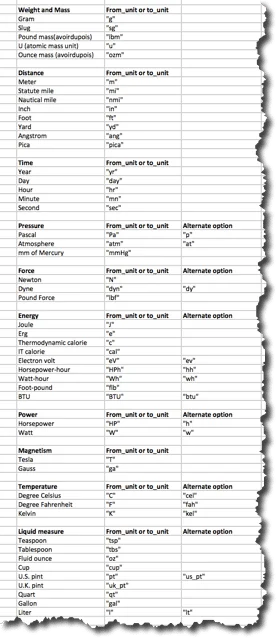
2015-02-22_14-20-27 Click to Download Spreadsheet File

Don’t Get CRAZY

If you to to convert minutes to meters.  Or inches to celsius, you will get an error. This will only work to convert F to C in Excel.

BONUS Download

Convert function spreadsheet <– Click to download the spreadsheet example

Check out Oz’s Book
2015-02-21_16-02-49

Guerrilla Data Analysis Using Microsoft Excel is yours for the taking.  Oz mentioned it again in this video, so you should check it out.

Written by

Rick Grantham
Rick GranthamSix Sigma Black BeltCo-founder, Excel TV

Business Intelligence Product Manager, VENUS Fashion Inc.

  • Business Intelligence
  • Data Analytics
  • Strategy
  • Team Building
Rick Grantham, a Six Sigma Black Belt and co-founder of Excel.TV in 2014, is currently serving as the Business Intelligence Product Manager at VENUS Fashion Inc. since March 2023. He has extensive experience in data analytics, strategic thinking, and team building, having held various leadership roles in renowned companies, such as Vice President of VantagePoint Business Solutions and Senior Director of Business Intelligence Solutions at EPI-USE. With a strong background in creating data-driven solutions and improving business processes, Rick has consistently demonstrated success in delivering exceptional results and boosting revenue throughout his career.

Read more articles by Rick Grantham

Editorial standards

Fact Checking & Editorial Guidelines

Every article on Excel TV is held to a published editorial standard. The goal: accurate, current, and useful — without filler.

  1. Expert review. Drafts on technical Excel topics are reviewed by a contributor with hands-on, working knowledge of the feature being covered.
  2. Source validation. Claims about Excel behavior are tested in current Microsoft 365 builds. Third-party product claims are sourced from the vendor's own documentation.
  3. Disclosure. Affiliate links, sponsorships, and any commercial relationships that influenced a piece are disclosed in-line and at the foot of the article.
  4. Updates. Articles are revisited when Microsoft ships changes that affect the content. The most recent revision date is shown on every post.

Spot a problem? Email editor@excel.tv and we will look at it.

Subject-matter review

Reviewed by Subject Matter Experts

Technical Excel articles are reviewed by contributors with verifiable, hands-on experience in the topic — not generalist editors.

  • Qualified reviewers. Reviewers include Microsoft Excel MVPs, working business-intelligence practitioners, and Excel TV editorial staff. See each author's page for credentials.
  • Current to a known Excel build. Procedural articles state which Excel version they were validated against. Where Microsoft has since changed behavior, the article carries an inline update note.
  • Clarity check. Reviewers verify steps are reproducible by a reader at the assumed skill level — not just technically correct in a vacuum.

Want to contribute or review for Excel TV? See the about page.