
In case you missed it, my new book, Advanced Excel Essentials, was released in early November.
Many early readers have already provided me with positive feedback about the book. In particular, several have mentioned they enjoyed my comments on using the IF function. So I delve into that in more detail in this blog post.
My thoughts on IF aren’t really new or original. In fact, what got me thinking about IFs at all was Daniel Ferry’s article, I Heart IF, at his ExcelHero blog. Daniel’s work opened my eyes. It didn’t so much convince me that IFs were overused; rather, it provided a deeper understand of Excel formulas and their applications. That understanding formed much of the material presented in Advanced Excel Essentials.
My argument about IFs, and really about all functions and formulas, is that they should be a natural fit to the underlying problem. In particular, nested IFs are often employed as the solution to every complicated scenario. A good example of this is Microsoft’s own help section on using nested IFs, which I’m excerpting below:
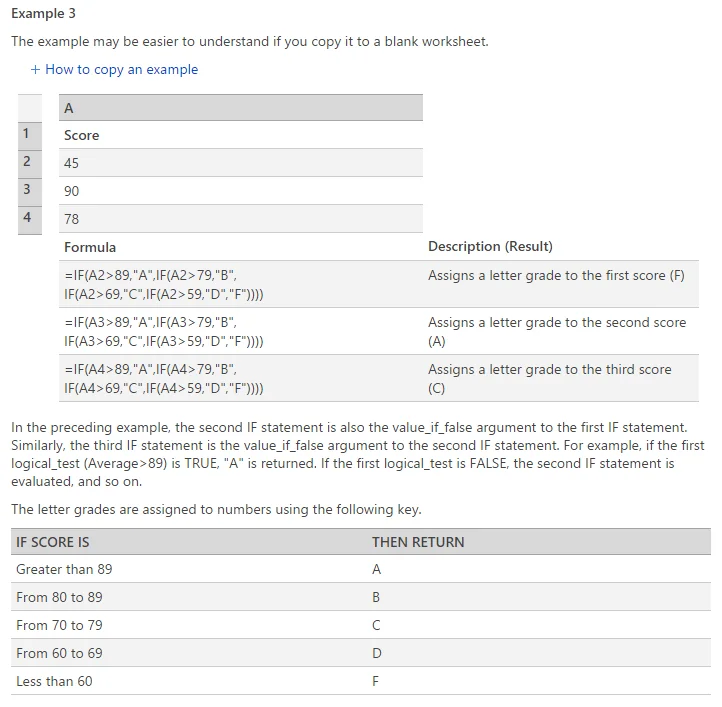
Without a doubt, the nested IF setup Microsoft presents works as intended. However, we have to think about what nested IFs are saying about the underlying problem. So let’s get a little philosophical about this. Let’s say your raw score for the overall course was a 65–so you should receive a D (next time, turn in your homework). But think about this: was the reason you received a D the direct consequence of not receiving an A, then not receiving a B, then not receiving a C? Not really. Receiving a D is the result of your raw score; it’s not conditionally dependent upon not receiving A, B, C or F. In other words, finding what letter grade you receive is really a lookup problem. It doesn’t require branching conditions.
If that all sounds confusing, think of the problem this way. How would these nested IFs above appear as a decision tree? It would be a bit of a mess, since you would be testing for the numerical region at each step. Again, however, finding where your letter grade falls within numerical bounds is not a decision problem. So I’m advocating we use nested IFs when the underlying problem can be described as a decision problem. In short: if you can draw a nice decision tree out of the problem, chances are nested IFs are a good fit.
The real question however is who cares? If a given solution works, why should it matter? My answer is simple. When we use IFs, we’re often modeling complex problems. If we hand the spreadsheet off to someone else, it will be that much harder for them to understand what’s going on. When IFs are a natural fit however, comprehension is much easier. And this makes sense: since the formulas simply become an extension of the underlying problem. But the real person you should do this for is yourself. Not you, right now; but the the you six months from now, who is going to look back at his or her old workbook. Using the correct formulas to match the underlying problem creates what I call, development memory. And it’s much easier to access previous development memory when the problem and implementation are intrinsically connected.
Underlying all of this is rethinking how we interact with our technology. Some people have pushed back on what I’ve been advocating. Usually the argument is some form of, I use what works for me, and that’s all that matters. But the last few years have presented significant interest in spreadsheet errors and their impact. I’m simply advocating that Excel be more than just a tool for data. If we think of Excel, and related technologies, as extensions of underlying problems, we’ll potentially mitigate the problem in which our model implementations become so complex, they’re hard to work with and understand. However, if we view Excel as an extension of the underlying problem, than our work is only as complicated as the problem itself.

Comments (2)
Historical comments preserved from the WordPress archive. Commenting is no longer active.
I would like to be proficient in Excel, and I believe that I’ll found right information in this book.
Thanks for sharing your knowledge with people.
You can be proud on you as you are contributing to others capacities developpment.
Congrats !!!!!!!
This article is as relevant today as it was when you first wrote it.