Excel TV ExcelTV

Play WAV Sound Files with Excel VBA

Updated
Play WAV Sound Files with Excel VBA

There are some tips on the show that seem to take on a life of their own.  People see them and they suddenly can’t wait to try it out.

Szilvia Juhasz is the contributor for a good portion of those tips.  She feeds the masses.  It’s a gift.

Credit Where Credit is Due

Szilvia first found this tip on John Walkenbach’s blog, The Spreadsheet Page.

bullet step 1

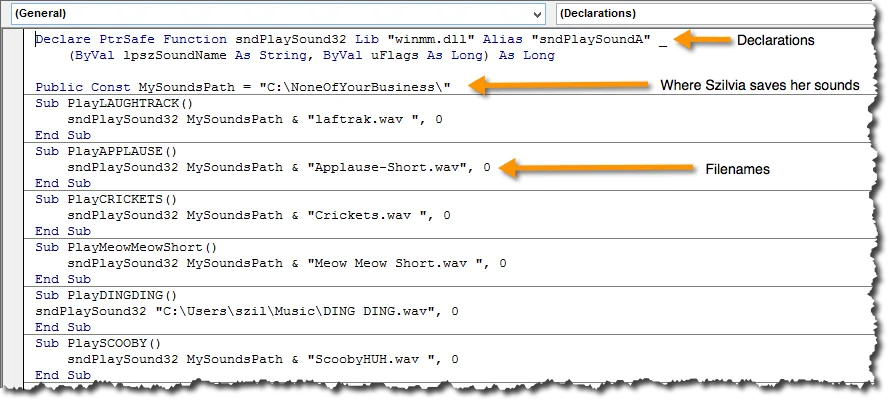
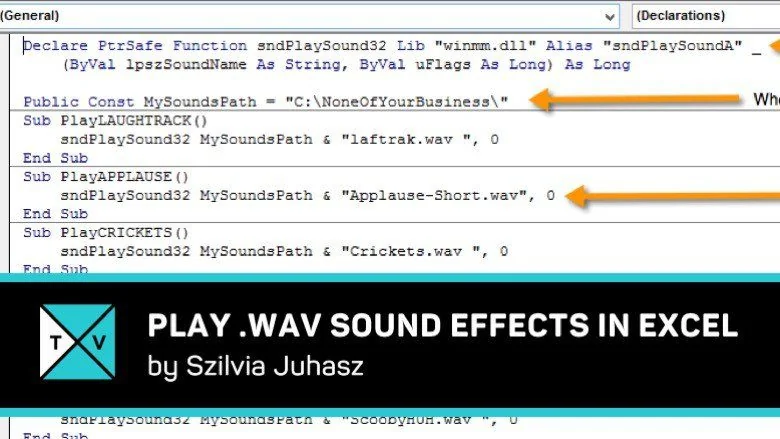
Set up Your Macro

Play Sound with Excel VBA Play Sound with Excel VBA

bullet step 2

Attach to the Macro to Something

You can attach a Macro to your Quick Access Toolbar (QAT) or different criteria, like when a cell changes values or moves above/below a threshold via a worksheet event.

2015-02-04_01-25-31a

BONUS Downloads

What’s Next?

How have you used this tip?  What sounds or files have you played?  Have questions for Szilvia?  Leave them in the comments section below.  You can also hire Szilvia at http://www.xszil.com

Written by

Rick Grantham
Rick GranthamSix Sigma Black BeltCo-founder, Excel TV

Business Intelligence Product Manager, VENUS Fashion Inc.

  • Business Intelligence
  • Data Analytics
  • Strategy
  • Team Building
Rick Grantham, a Six Sigma Black Belt and co-founder of Excel.TV in 2014, is currently serving as the Business Intelligence Product Manager at VENUS Fashion Inc. since March 2023. He has extensive experience in data analytics, strategic thinking, and team building, having held various leadership roles in renowned companies, such as Vice President of VantagePoint Business Solutions and Senior Director of Business Intelligence Solutions at EPI-USE. With a strong background in creating data-driven solutions and improving business processes, Rick has consistently demonstrated success in delivering exceptional results and boosting revenue throughout his career.

Read more articles by Rick Grantham

Editorial standards

Fact Checking & Editorial Guidelines

Every article on Excel TV is held to a published editorial standard. The goal: accurate, current, and useful — without filler.

  1. Expert review. Drafts on technical Excel topics are reviewed by a contributor with hands-on, working knowledge of the feature being covered.
  2. Source validation. Claims about Excel behavior are tested in current Microsoft 365 builds. Third-party product claims are sourced from the vendor's own documentation.
  3. Disclosure. Affiliate links, sponsorships, and any commercial relationships that influenced a piece are disclosed in-line and at the foot of the article.
  4. Updates. Articles are revisited when Microsoft ships changes that affect the content. The most recent revision date is shown on every post.

Spot a problem? Email editor@excel.tv and we will look at it.

Subject-matter review

Reviewed by Subject Matter Experts

Technical Excel articles are reviewed by contributors with verifiable, hands-on experience in the topic — not generalist editors.

  • Qualified reviewers. Reviewers include Microsoft Excel MVPs, working business-intelligence practitioners, and Excel TV editorial staff. See each author's page for credentials.
  • Current to a known Excel build. Procedural articles state which Excel version they were validated against. Where Microsoft has since changed behavior, the article carries an inline update note.
  • Clarity check. Reviewers verify steps are reproducible by a reader at the assumed skill level — not just technically correct in a vacuum.

Want to contribute or review for Excel TV? See the about page.

Comments (1)

Historical comments preserved from the WordPress archive. Commenting is no longer active.

  1. Margono, S.Pd.

    Sorry
    I need a file (excel) for play wav sound in 64 byte
    Please sent to me.